Video Demo: MQTester for AUTOSAR AP Model...
Read More

Video Demo: MQTester for AUTOSAR AP Model...
Read More
Video Demo: Real‑Time Recording of Data Store...
Read More
Video Demo: Handling Isolated Elements in MQTester...
Read More
Video Demo: Using the Expectation Function expExpress...
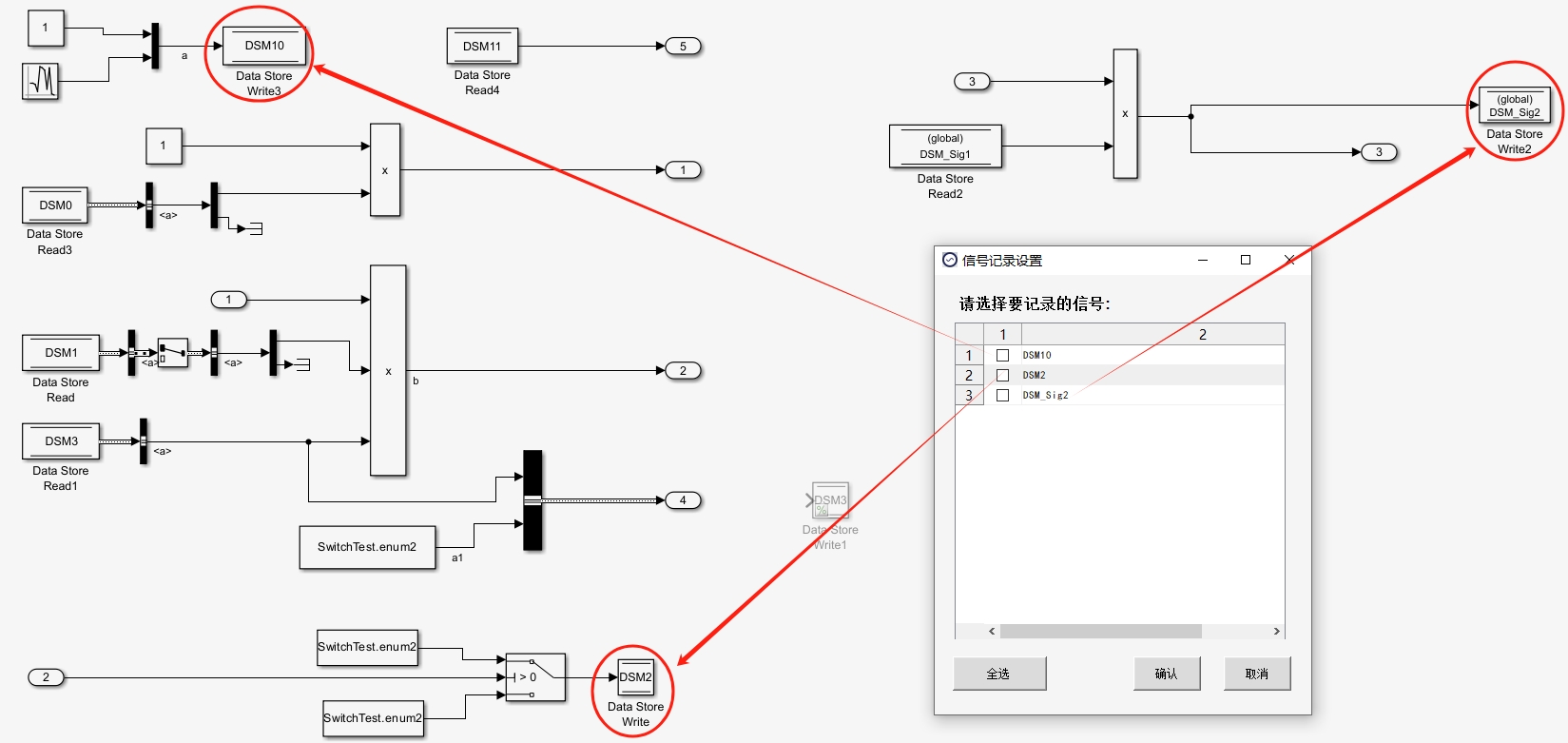
Read MoreData Store Memory (DSM) variables in Simulink are system-wide global variables that facilitate data exchange between components within a model. Recording the changes in these global variables provides critical data support for rapid issue diagnosis, especially for those used within Stateflow.
Solution: Our tool automatically identifies all DSMs used in Simulink models and Stateflow, including instances defined via DSM blocks and Simulink.Signal objects. It comprehensively analyzes the scope of usage for each DSM and applies the appropriate method to handle them automatically, thereby achieving the capability to auto-record Data Store Memory variables utilized by the object under test.
In practical applications, not all DSMs need to have their contents recorded. Therefore, a user selection interface is provided to choose which variables require recording.
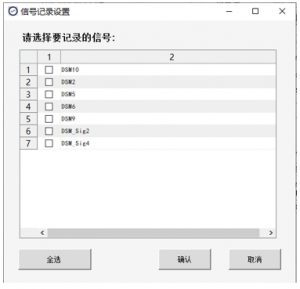
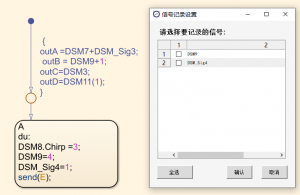
After user selection, the tool automatically configures logging properties or generates corresponding variables in the base workspace based on how each variable is used. This eliminates the tedious manual process of locating and setting up signals, enabling easy signal logging and parameterization. Crucially, for the recorded values to be meaningful, the test result assessment must be capable of evaluating these variables.
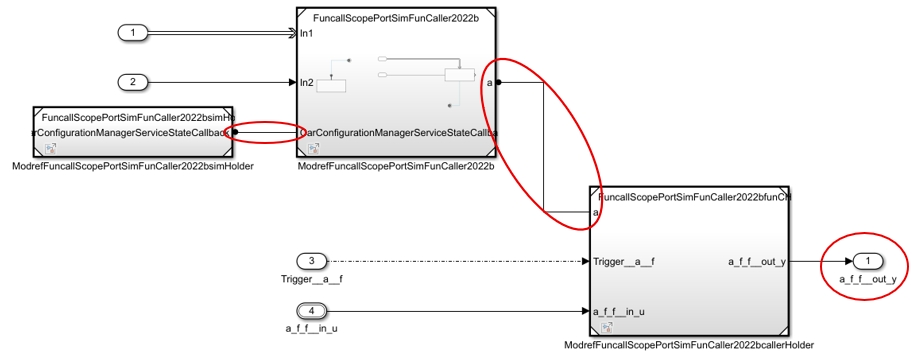
With the increasingly widespread application of Autosar AP models, many traditional testing tools only support Autosar CP models, making the generation of test environments for AP models difficult. Even when some software can manage to produce a test environment, the generated environment often cannot be executed in simulation. In such cases, the core modules must be extracted from the model and modified before testing can proceed. This approach is not only inefficient but also lacks guaranteed accuracy and validity, as the tested object is not equivalent to the original model.
Solution: By deeply parsing the AP model and targeting port-based function definitions, our tool automatically constructs a complete test environment: it generates corresponding function calls for port-based function prototypes in separate models, adds input and output signals for these functions, and then connects them to the correct function call ports in the main model. If the function prototype called in the original model does not exist, the tool automatically generates the prototype in another model based on the call information and connects it to the appropriate port in the main model—all without manual intervention, improving efficiency and ensuring test completeness. Throughout this process, it handles the data type definitions used by the functions accordingly, guaranteeing that the generated test environment can be correctly executed in simulation.
During testing, it is necessary not only to test normal operating conditions but also to evaluate various abnormal scenarios such as transient faults, permanent faults, and other exception types to verify the system’s ability to handle illegal signals. This requires fault injection testing functionality, which is especially essential in interface testing.
Solution: Fault injection is implemented by recording intermediate signals directly in the model and allowing test cases to inject abnormal values into the signals at designated fault injection points. After determining the injection points, the signals available for input in the test cases are expanded, enabling arbitrary abnormal values to be injected at any moment. Once the fault injection ends, the original signals are immediately restored, while ensuring that the intermediate values at the injection points can also be evaluated. By using Simulink signal line properties, markers can be added to points requiring fault injection. The system automatically checks attributes such as the signal data type to ensure correctness of the injected signal properties. Compared to traditional manual model modification, this fault injection approach significantly improves the efficiency of abnormal testing, supplements edge cases and fault conditions not covered by normal testing, and ensures system stability when encountering real-world faults.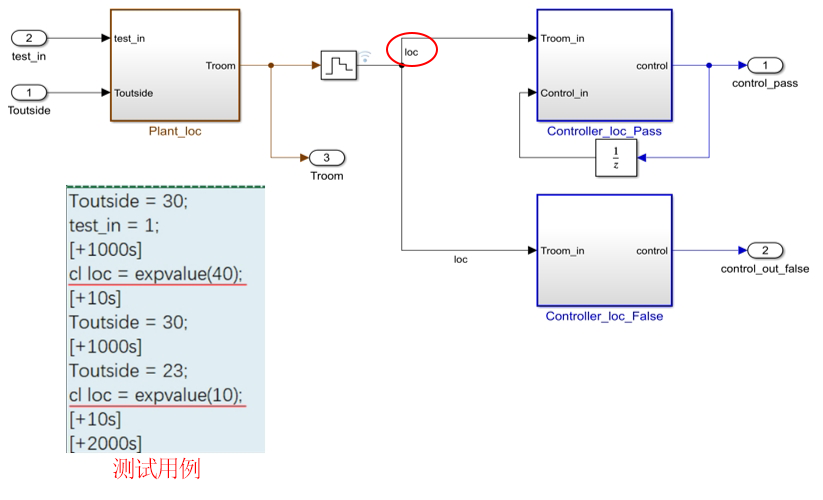
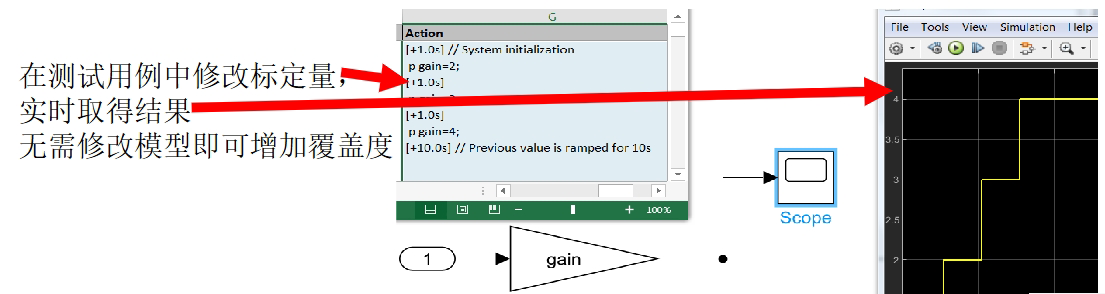
When testing different values of calibration parameters, their values need to be modified within the domain defined by the parameters. Current testing tools typically only allow modification before the simulation of a single test case runs. This means each test case can only validate one specific value, necessitating the creation of multiple test cases for multiple values, which increases the number of similar test cases and extends testing time. It also prevents results from different calibration values from being displayed in a single plot.
Solution: During the simulation process, the execution can be paused to modify the value of a calibration parameter, and then resumed to continue the current simulation. This enables testing all variations within a single test case, significantly improving testing efficiency.
Example: Take a Gain block in a model whose value is assigned by a variable as an example. Within a test case, its value can be adjusted directly and dynamically, with results obtained in real time. This allows rapid simulation of multiple scenarios without modifying the model or interrupting the simulation, greatly enhancing testing efficiency and coverage.
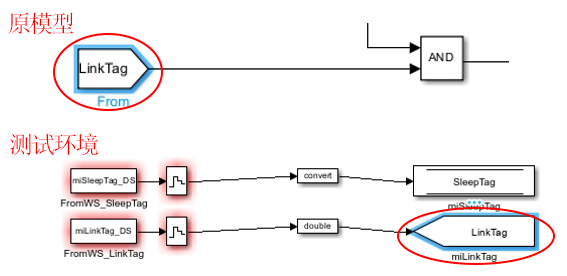
In Simulink models, elements such as Simulink Function and Function Caller, Goto and From, and Data Store Write/Memory and Data Store Read are used in pairs. However, they may not reside at the same hierarchical level. During testing, if the object under test contains only “isolated elements” like Function Caller, From, or Data Store Read, the simulation may fail due to the missing counterpart module.
Solution: Depending on the scenario—whether the counterpart module exists elsewhere in the model but not in the test object, or is entirely absent from the model—different measures are taken to automatically complement the corresponding modules or add the necessary input signals, ensuring smooth simulation execution.
Example: (using Goto and From modules) If a From module is present in the test object but its corresponding Goto module is missing, the tool automatically identifies this isolated signal, complements it with a Goto module in the test environment, and treats the variable as an input signal—allowing its value to be modified at any time when writing test cases. This ensures both simulation continuity and seamless testing progression.
The traditional manual method of writing test cases is not only time-consuming but also heavily reliant on individual expertise. Furthermore, manual exhaustive enumeration becomes impractical with a high number of combinations, often leading to incomplete combinations and inadequate test coverage, which directly results in insufficient test coverage.
Solution: We provide a multi-modal, high-efficiency test case generation solution that meets all requirements:
Script/Table-based Case Generation: An intuitive table-filling interface intelligently inherits signal initial values, requiring only the definition of signal values over time. It offers auxiliary functions and Matlab expressions, automatically generates assessment functions, and significantly improves authoring efficiency.
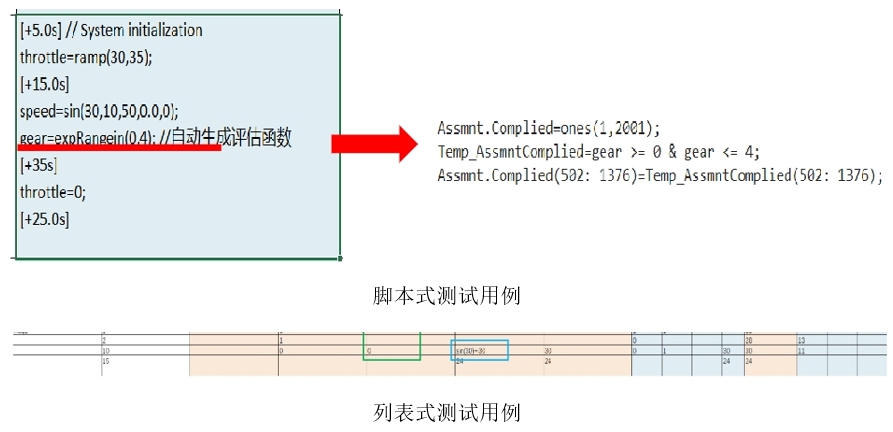
Full Combination Test Cases (Equivalence Class Combination Cases): Automatically selects signal values (user-modifiable), intelligently constructs test combinations, and supports the embedding of assessment or expectation value functions, achieving comprehensive testing for various scenarios.
High-Coverage Case Auto-generation: Automatically generates test cases with the highest coverage based on the model. Assessment functions can be used for automatic result evaluation, fundamentally ensuring test sufficiency and objectivity.
Coverage Gap Filling: Automatically generates test cases to supplement missing coverage based on the current coverage status of existing test cases.
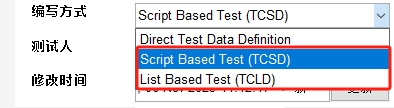
Example: When creating a test group in the MQTester interface, users can freely choose between script-based or table-based methods. These diverse authoring methods make testing more flexible.
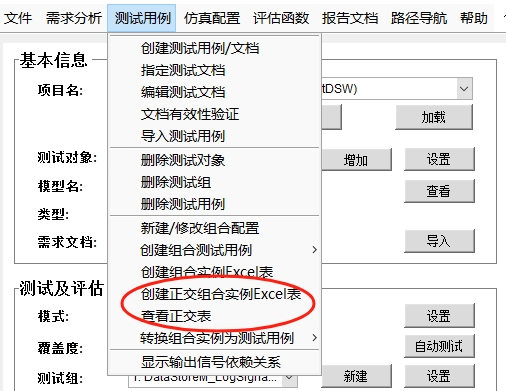
Under the test case menu, users can see a series of options related to combination testing. After selecting “New,” the combination configuration file is automatically generated and opened. This file lists all configuration information required for permutations and combinations of the current object under test. Users can configure expected values or assessment functions within the file as needed.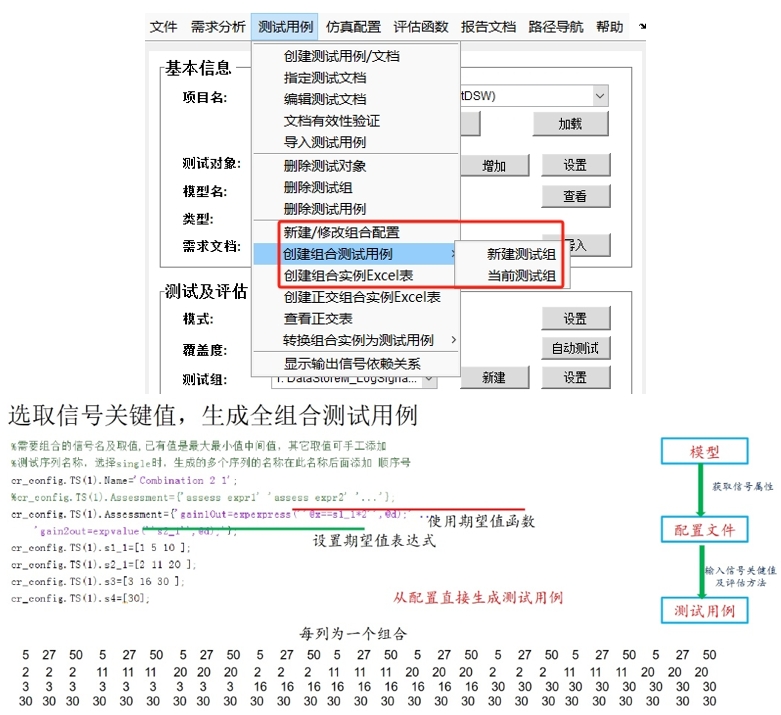
In MQT, using the “Auto Test” command automatically generates test cases with the highest coverage. By selecting Simulation Configuration -> Fill Coverage Gaps from the dropdown menu, new test cases are generated based on the current test coverage.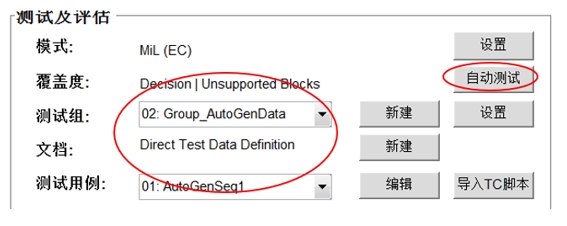
When there are many input signals, the number of combinations can easily become extremely large. For example, with 13 input signals and 3 possible values for each signal, the number of combinations is 3¹³ = 1,594,323. This already exceeds the maximum number of rows that can be stored in an Excel sheet (1 million), and MATLAB’s processing speed for such non-matrix data is also quite slow.
Solution: Based on the number of elements and possible values in the combination, the system automatically selects a suitable orthogonal array using orthogonal design theory. It then picks representative test case combinations according to the orthogonal array, eliminating redundant ones. When the number of combinations is enormous, this significantly reduces the total number of combinations, improves test case efficiency, and lowers time costs. When the number of elements exceeds 4, orthogonal arrays can reduce the test volume by over 90%. Using an orthogonal array, the example above would require only 27 representative combinations.
Example: MQTester provides functionality to automatically select an orthogonal array and then generate orthogonal combinations based on the selected array.