During model-based testing, when dealing with models containing Data Store Memory (DSM) modules, especially within Stateflow Chart subsystems, engineers often face the following challenges:
- Difficulty in flexibly adjusting the values of DSM variables during testing, particularly for such variables within Stateflow Charts.
- Tedious handling of isolated elements within the unit under test.
To address these issues, MQTester has added a new capability to log Data Store Memory variables used within the unit under test.
This feature enables the logging, modification, and analysis of key DSM signals during model execution, significantly improving the efficiency of testing and debugging complex systems.
Flexible Feature Configuration
By setting the parameter PropGUIDefault.testbed.DSMemoryLog in the MQTester_GUIcommonProper file, different modes can be selected to meet diverse testing needs:
- 0: Disable: Disables the Data Store Memory logging function.
- 1: Log All: Logs all Data Store Memory signals within the unit under test (select all).
- 2: Focus on Chart: Logs all Data Store Memory signals located inside Stateflow Charts within the unit under test.
- 3: Custom Selection: Opens a selection window, allowing users to freely check specific Data Store Memory signals they wish to log.
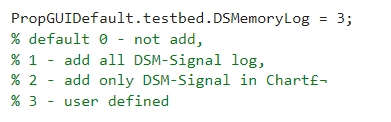
Figure 1: Specific Feature Settings
Detailed Operational Instructions
yLogging and Variable Generation (Data Store Memory or Variables)
MQTester automatically calculates the Data Store Memory modules or variables within the unit under test (the selected subsystem) from which signals can be logged.
During test harness generation, the system will automatically pop up the “Set Logging Signals” window, where signals to be logged can be selected. MQTester will set the corresponding properties for the selected signals or, if necessary, automatically generate corresponding Simulink.Signal variables in the Base Workspace and set their properties, facilitating subsequent modification and parameterization during testing.
Note: Data Store Write modules associated with Bus signals cannot be logged.
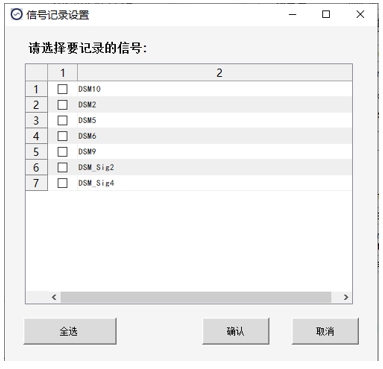
Figure 2: “Signal Logging Settings” Window
The signal names used by Data Store Memory modules and variables for which the logging property is set are directly reflected in the test cases. This supports direct assignment of expected values or direct assignment of values to signals within the unit under test that do not have a corresponding Data Store Write module, solving the problems of difficult debugging and evaluation of DSM signals.
Note (Signal Names) :
- For vector signals, the signal names used differ from the Data Store Memory name, as a unique signal name needs to be allocated for each element within the vector.
- For Data Store modules requiring an additional Simulink.Signal variable, if a variable with the same name already exists, the required Simulink.Signal variable and its corresponding Data Store module will be renamed to a new name.
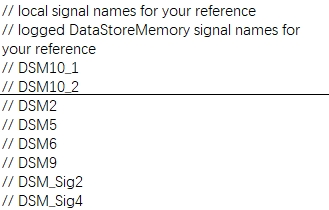
Figure 3: Signals Directly Displayed in Test Case
Example : In this demonstration model, the DSM10 module is a two-dimensional vector variable, represented in the test case as DSM10_1 and DSM10_2.
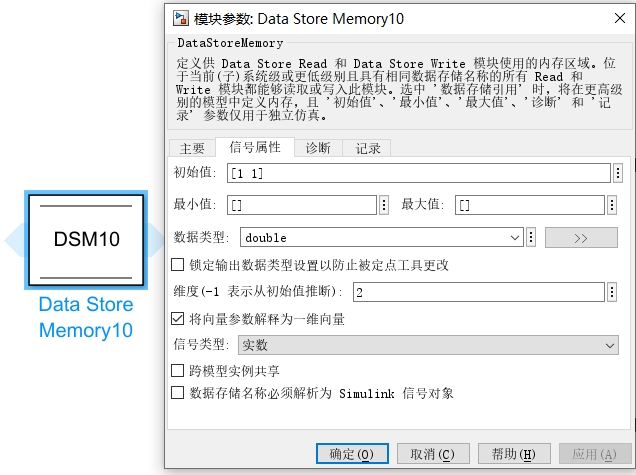
Figure 4: DSM10 Module Parameter Description
If the property values (such as data type, value, etc.) of Simulink.Signal variables logged in the Base Workspace are inconsistent with their definitions in the original model, conflicts and errors may occur during test harness regeneration.
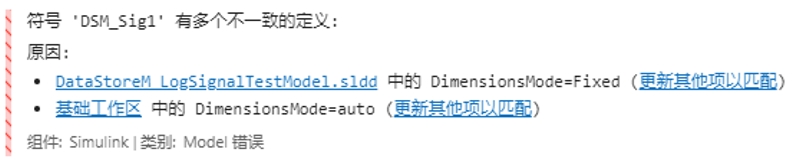
Figure 5: Conflict Error Triggered
To address this, MQTester has added the “Delete Redundant Variables in BsWs” command under the Help menu bar. This command deletes variables with the same name logged in the Base Workspace as those contained in the SLDD (Simulink Data Dictionary), resolving conflict issues.
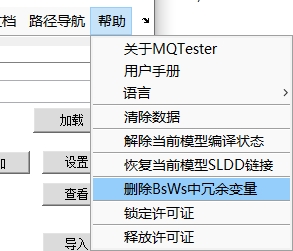
Figure 6: “Delete Redundant Variables in BsWs” Command
Intelligent Signal Handling (For Data Store Read)
When only a Data Store Read module exists within the unit under test (the selected subsystem), and its corresponding Data Store Memory module is located in the parent (upper-level) system:
MQTester will automatically generate the corresponding Data Store Write module in the test harness directory (…/MQTTestData/additionalDataStoreMW). In this case, the Data Store Read is treated as an input signal, and its value can be changed arbitrarily without requiring additional logging.
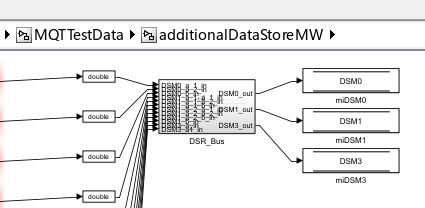
Figure 7: Corresponding Module Automatically Generated in Test Harness
When the entire model is selected as the unit under test:
The Data Store Memory modules corresponding to Data Store Read modules that are treated as input signals will be deleted to avoid conflicts with the properties of the generated global Simulink.Signal variables.
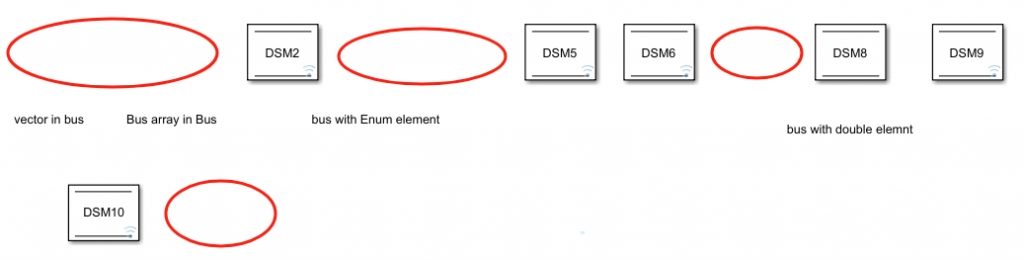
Figure 8: Corresponding DSM Module Deleted (Indicated by Red Circles)
In-Depth Support for Stateflow Chart
Variables within Stateflow are processed using the same method. MQT automatically analyzes whether the chart contains assignment statements for DSM variables to decide whether to add an input signal or include the DSM in the list of loggable signals.
Within the Chart selected as the unit under test, MQTester automatically analyzes the contained DSM variable assignment statements to intelligently determine signal direction:
- DSM3, DSM7, DSM_Sig3, DSM11 are automatically added as input signals.
- DSM8, DSM9, DSM_Sig4 are automatically included by MQT in the list of loggable signals. Note: DSM8 is a Bus signal and cannot be logged.
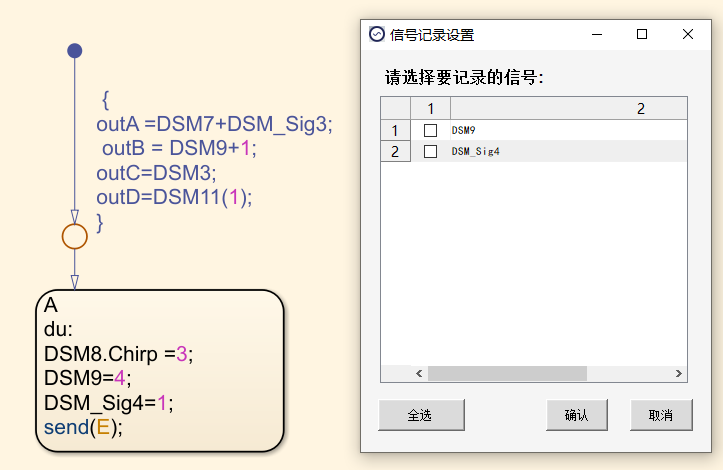
Figure 9: Automatic Logging of DSM Signals in Stateflow
By directly logging intermediate variables within Stateflow, MQT enables real-time monitoring and modification of key variables without the need to trace back to output signals in upper-level systems. This accelerates fault localization and improves testing efficiency.
The capability of MQTester to log Data Store Memory variables used in the unit under test aims to efficiently log and analyze signal data during model operation, simplifying the process of data collection and modification. It is particularly suitable for simulation testing of complex systems and can effectively assist engineers in:
- Gaining a deep understanding of model behavioral logic.
- Quickly locating and troubleshooting operational faults.
- Comprehensively improving model debugging efficiency and performance analysis capabilities.
Contact Us
Zhejiang Qiusuo Software Technology Co., Ltd.
- Phone: +86 150 108 23652
- WeChat: yuyongke1797448900
- E-mail: yuyongke@model-soft.com
- URL: www.model-soft.com